
You can check your Qatar visa status in under 2 minutes using the MOI portal, the Hayya platform, or the Metrash2 app – all free, no registration required. Whether you applied for a tourist e-Visa, a Hayya entry permit, or a work visa, the Ministry of Interior (MOI) Qatar provides online tools to track your application by visa number or passport number. This guide walks you through every method, explains what each status message means, and tells you exactly what to do next.
Before you check, make sure you have the correct documents ready. If you have not yet applied, see our Qatar visa requirements checklist first.
How to Check Qatar Visa Status on the MOI Portal
The MOI Qatar portal at moi.gov.qa is the primary method for checking visa status for nearly all visa types, including tourist visas, work permits, and family visas.
Step-by-step instructions:
- Go to the official MOI Qatar website at portal.moi.gov.qa
- Click Inquiries in the main navigation menu
- Select Visa Services from the dropdown
- Click Visa Inquiry and Printing
- Choose your search method: Visa Number or Passport Number
- If searching by visa number, enter the 15-digit number from your visa document
- If searching by passport number, enter it exactly as printed (including any letters)
- Select your nationality from the dropdown menu
- Complete the CAPTCHA verification code shown on screen
- Click Submit to view your visa status instantly
The results page shows your current status, visa type, validity dates, and sponsor details (for work visas). You can print this page as proof of your visa status – this serves as your official visa printout.
Tip: Always double-check that your passport number matches exactly what you entered in your application. Even a single wrong character will return “No Record Found.”
How to Track Your Hayya e-Visa Status
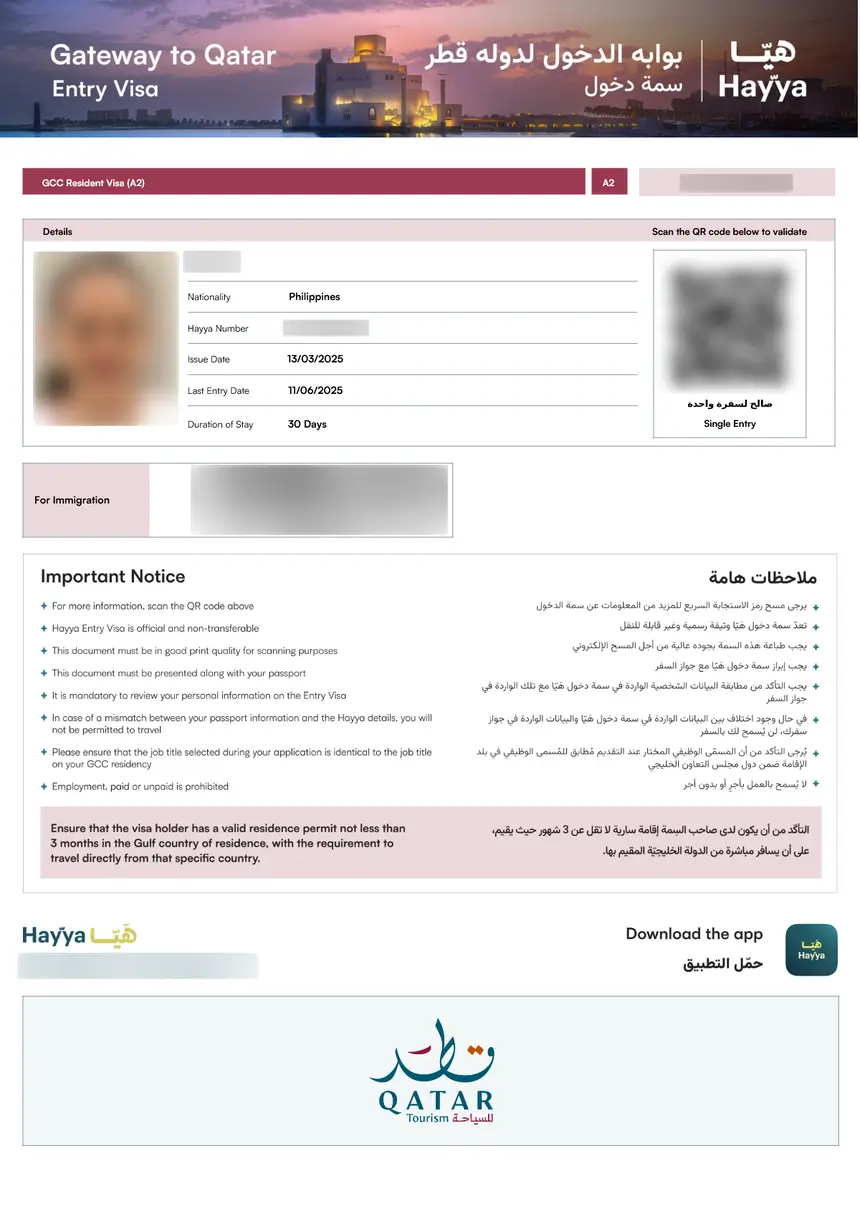
If you applied for your Qatar visa through the Hayya platform (hayya.qa), you can track your application using your Entry Reference Number.
Steps to check Hayya visa status:
- Visit hayya.qa/en/visa-inquiry
- Enter your Entry Reference Number (provided when you submitted your application)
- Click Track to view your application status
The Hayya platform is used for tourist e-Visas (types A1, A2, A3, and A4). If you applied through Hayya, this is the correct portal to check – the MOI portal may not show Hayya applications.
Key difference: The MOI portal uses visa number or passport number, while Hayya uses your Entry Reference Number. See the comparison table below for details.
How to Check Qatar Visa Status Using the Metrash2 App
The Metrash2 app is the official mobile application from MOI Qatar, available on both iOS and Android. It allows Qatar residents and applicants to check visa status on the go.
Steps to check via Metrash2:
- Download the Metrash2 app from the App Store or Google Play
- Log in with your QID (Qatar ID) or register a new account
- Navigate to Visa Services within the app
- Select Visa Inquiry to view your current visa status
- Enter your visa number or passport number when prompted
- Your status will display on screen with the same details as the MOI portal
Metrash2 is especially useful for residents who need to check visa status for family members or employees sponsored under their QID.
Qatar Visa Status Meanings: Complete Reference
After checking your visa, you will see one of the following status messages. Here is what each one means and what action to take:
| Status Message | What It Means | Action Required |
|---|---|---|
| Application Received | Your application is submitted and under initial review | No action needed – wait |
| Under Process | Authorities are verifying your documents and eligibility | Wait – check again in 2-3 days |
| Pending Review | Waiting for ministry approval or internal checks | Wait – check again after 3 days |
| Additional Documents Required | You must upload or provide extra documents | Act immediately – contact your sponsor or embassy |
| Under Security Review | Background and security clearance in progress | Wait – can take 5-10 working days |
| Approved | Your visa has been officially accepted | Proceed with travel arrangements |
| Ready to Print | Visa approved and ready to download or print | Log in to the portal and print your visa now |
| Issued | Visa granted and valid for travel | Travel with your printed visa document |
| On Hold | Processing paused – clarification needed | Contact your sponsor or the Qatar Embassy |
| Rejected | Application denied due to documentation or eligibility issues | Review rejection reasons and reapply |
| Expired | The visa validity period has ended | Renew online or contact your sponsor |
| Cancelled | Visa cancelled by applicant, sponsor, or authorities | Contact your sponsor for next steps |
| No Record Found | Details entered do not match any application | Double-check your information (see troubleshooting below) |
Most tourist e-Visa applications show “Under Process” for 3-5 working days before moving to “Approved” or “Ready to Print.”
MOI Portal vs Hayya Platform: Which One to Use?
Not sure which portal to check? Use this guide:
| Feature | MOI Portal | Hayya Platform |
|---|---|---|
| URL | portal.moi.gov.qa | hayya.qa/en/visa-inquiry |
| Search by | Visa number or passport number | Entry Reference Number |
| Visa types covered | Work, family, tourist, transit | Tourist e-Visa (A1, A2, A3, A4) |
| Print visa | Yes – direct from results page | Yes – after approval |
| Mobile app | Metrash2 | Hayya to Qatar app |
| Best for | All visa types, especially work permits | Tourist e-Visa applications |
If you applied through a sponsor or employer, check the MOI portal. If you applied through the Hayya website for a tourist visa, check Hayya. If you are unsure which portal you used, try both – the MOI portal covers the widest range of visa types.
For a full breakdown of Qatar visa categories, see our Qatar visa types guide.
Qatar Visa Processing Times
Processing times depend on your nationality, visa type, and how you applied:
| Visa Type | Typical Processing Time |
|---|---|
| Tourist e-Visa (Hayya A1/A2) | 3-5 working days |
| Visa on Arrival (nationality-dependent) | Immediate at airport |
| Transit Visa | 1-3 working days |
| Work Visa (employer-sponsored) | 5-15 working days |
| Family Visit Visa | 3-7 working days |
| GCC Resident Visa (A2) | 3-5 working days |
Factors that affect processing time:
- Nationality: Some nationalities require additional security clearance, which adds 5-10 working days
- Document quality: Blurred scans or incomplete forms slow down processing
- Peak seasons: Processing may take longer during Ramadan, Eid holidays, and major events
- Security review: Applications flagged for security review take 5-10 additional working days
If your status has been “Under Process” for more than 10 working days, contact the MOI helpline or your sponsor. For more details on the full application process, see our Qatar e-Visa guide.
What to Do If Your Qatar Visa Is Rejected
A visa rejection is not the end of the road. Most rejections are due to fixable issues.
Common reasons for Qatar visa rejection:
- Incomplete or incorrect application form
- Invalid or blurred passport or photo documents
- Passport with less than 6 months validity remaining
- Inconsistencies in personal details (name spelling, date of birth)
- Previous visa overstays or travel bans in GCC countries
- Employment category does not match the visa type applied for
- Missing hotel booking for visa-on-arrival applicants
Steps to fix a rejected application:
- Review the rejection reason displayed on the portal
- Double-check all your documents for errors or missing information
- Contact the MOI support team or your sponsor to clarify the specific issue
- Correct the problem and resubmit your application with accurate details
You can reapply immediately after fixing the issue – there is no mandatory waiting period for most visa types.
For the complete document checklist, refer to our Qatar visa requirements page.
“No Record Found”: Troubleshooting Guide
If the MOI portal returns “No Record Found” when you search, do not panic. This usually means one of the following:
Possible causes and fixes:
- Typo in passport or visa number – Re-enter carefully, including any letters and leading zeros
- Wrong nationality selected – Make sure the nationality matches exactly what you used in your application
- Application still processing – New applications may take 24-48 hours to appear in the system
- Checking the wrong portal – If you applied through Hayya, check hayya.qa instead of the MOI portal
- Visa number format error – The visa number should be exactly 15 digits
- Application was never submitted – Check your email for a confirmation message from MOI or Hayya
If none of these apply, contact the MOI helpline at +974 4455 8888 or visit a MOI Service Center in person.
FAQs About Qatar Visa Status
How do I check if my Qatar visa is approved?
Visit portal.moi.gov.qa, go to Inquiries > Visa Services > Visa Inquiry and Printing, enter your visa or passport number, select your nationality, complete the CAPTCHA, and click Submit. If approved, the status will show “Approved” or “Ready to Print.”
Can I check my Qatar visa status using just my passport number?
Yes. On the MOI Visa Inquiry page, select the “Passport Number” option instead of “Visa Number,” then enter your passport number exactly as printed, select your nationality, and submit.
How long does Qatar visa approval take?
Tourist e-Visas typically take 3-5 working days. Work visas take 5-15 working days. Applications requiring security clearance may take an additional 5-10 working days.
What does “Under Process” mean for a Qatar visa?
“Under Process” means the authorities are actively verifying your documents and eligibility. This is a normal status – check again in 2-3 days for updates.
What does “No Record Found” mean on the MOI portal?
It means the details you entered do not match any application in the system. Double-check your passport number, nationality selection, and make sure you are using the correct portal (MOI for work/family visas, Hayya for tourist e-Visas).
How do I print my Qatar visa after approval?
Log in to the MOI portal or Hayya platform, navigate to Visa Inquiry and Printing, enter your details, and click Print on the results page. You can also download the visa as a PDF.
Can I check Qatar visa status on my phone?
Yes. Download the Metrash2 app (for MOI portal checks) or the Hayya to Qatar app (for Hayya e-Visa tracking) from the App Store or Google Play.
What should I do if my Qatar visa is rejected?
Review the rejection reason on the portal, fix the issue (usually incomplete documents or incorrect details), and reapply. There is no mandatory waiting period for most visa types.
Is there a fee to check Qatar visa status?
No. Checking your visa status on the MOI portal, Hayya platform, or Metrash2 app is completely free.
What is the difference between the MOI portal and Hayya for visa tracking?
The MOI portal (portal.moi.gov.qa) covers all visa types and uses visa or passport numbers. Hayya (hayya.qa) is specifically for tourist e-Visas and uses the Entry Reference Number. If you applied through Hayya, check there first.