

To apply for a Qatar e-Visa online, go to hayya.qa, create an account, select your visa type (A1 Tourist, A2 GCC Resident, A3 ETA, or A4 Companion), fill out the application form, upload your documents, and pay QAR 100. Processing takes 1-3 business days. Qatar’s Hayya platform replaced the older MOI visa system as the sole official portal for all e-Visa applications. This guide walks you through every step, from account creation to printing your approved visa.
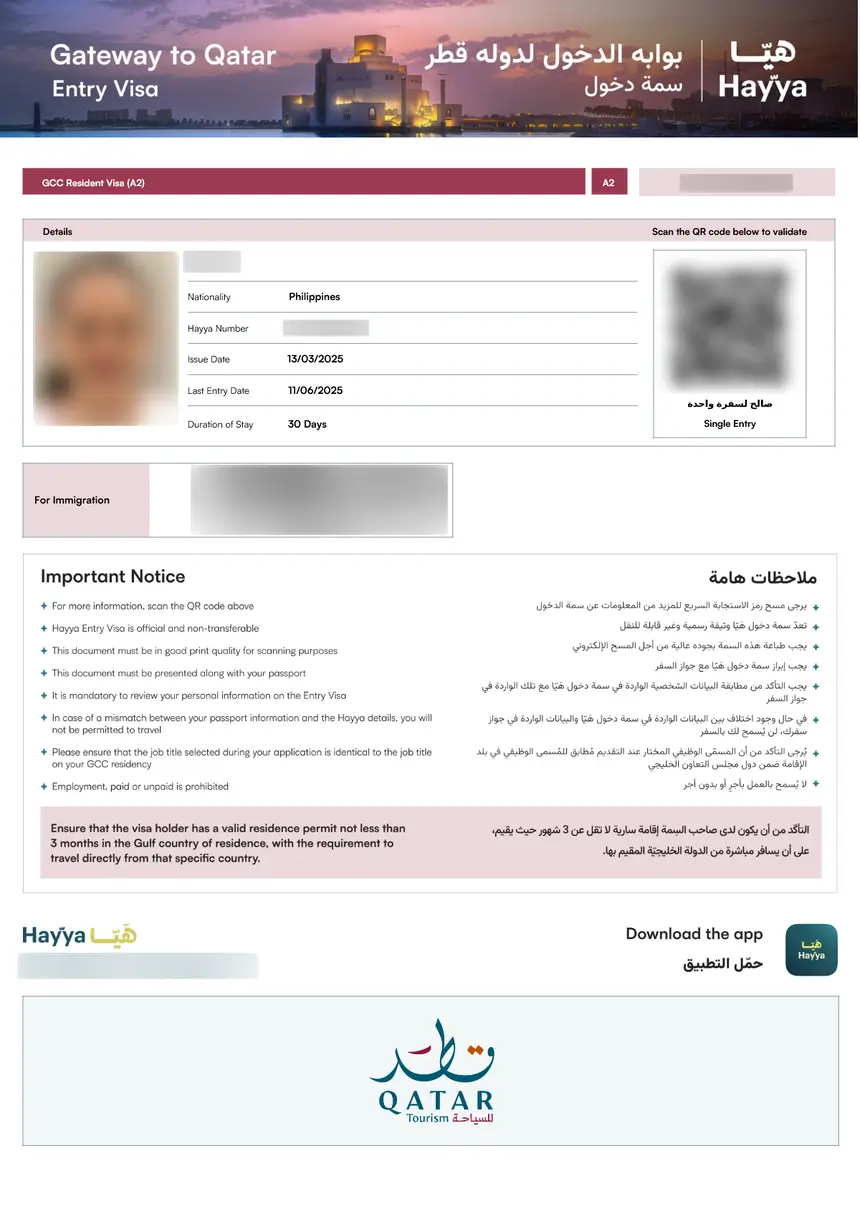
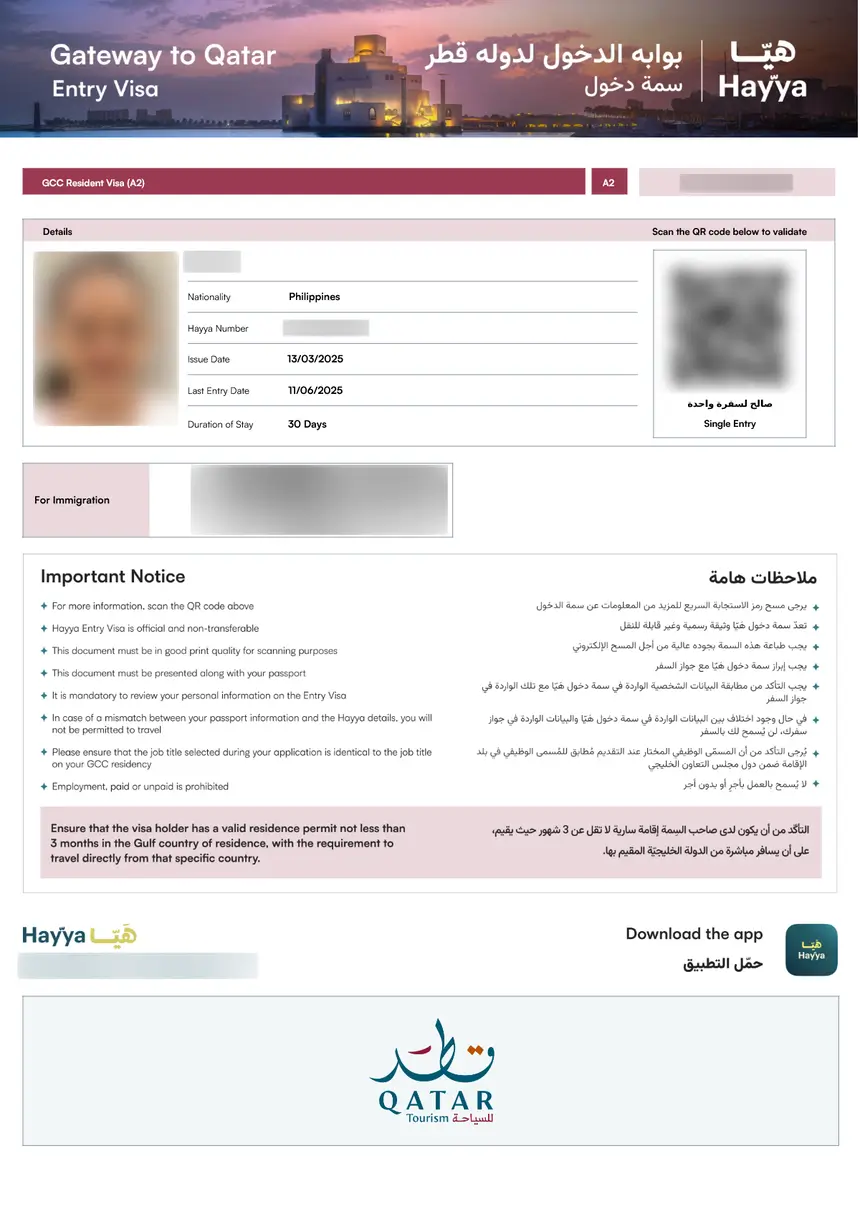
Before applying, confirm that you need an e-Visa at all – citizens of 90+ countries qualify for visa-free entry to Qatar and do not need to apply online.
Which Qatar e-Visa Type Should You Apply For?
The Hayya platform offers four e-Visa categories. Choose the correct one based on your nationality and residency status:
| Visa Type | Who It’s For | Stay Duration | Fee |
|---|---|---|---|
| A1 Tourist Visa | Most nationalities visiting for tourism | 30 days | QAR 100 |
| A2 GCC Resident Visa | Residents of Bahrain, Kuwait, Oman, Saudi Arabia, UAE (any nationality) | 30 days | QAR 100 |
| A3 ETA (Electronic Travel Authorization) | Nationals/residents of specific eligible countries | 30 days | QAR 100 |
| A4 Companion Visa | Companions traveling with a GCC citizen | 30 days | QAR 100 |
| F1 Visa-Free (US citizens) | US passport holders | 90 days | Free |
Not sure which type applies to you? Visit our complete Qatar visa types breakdown for eligibility details per category.
Step 1: Create Your Hayya Account
- Go to hayya.qa in your web browser
- Click Login in the top-right corner
- Select Register to create a new account
- Enter your email address (use one you check regularly – approval notifications go here)
- Create a password (minimum 8 characters)
- Verify your email by clicking the confirmation link Hayya sends you
- Log in with your new credentials
Tip: You can also download the Hayya to Qatar app from the App Store or Google Play and register there. The app lets you manage your visa, track application status, and store your approved e-Visa digitally.
Step 2: Select Your Visa Type and Start the Application
Once logged in:
- Click Apply for an E-Visa on the Hayya dashboard
- The platform will ask you to specify your journey type: Flying to Qatar or Driving to Qatar (via Abu Samra border)
- Enter your nationality – Hayya uses this to auto-determine which visa types you qualify for
- Select the appropriate visa category from the options shown (A1, A2, A3, or A4)
The system will then display the specific documents and requirements for your selected visa type. Read these carefully before proceeding.
Step 3: Fill Out the Application Form
The Hayya application form requires the following information:
Personal details:
– Full name (exactly as printed on your passport)
– Date of birth
– Gender
– Nationality
– Passport number
– Passport expiry date
Travel details:
– Intended arrival date in Qatar
– Purpose of visit
– Accommodation address in Qatar (hotel name and address)
Contact information:
– Email address
– Phone number (with country code)
– Current residential address
Critical: Enter your name exactly as it appears in your passport. Even small discrepancies (e.g., “Mohammed” vs. “Muhammad”) can cause delays or rejection. Check our Qatar visa requirements guide for the full document checklist.
Step 4: Upload Required Documents
Prepare digital copies of these documents before starting:
| Document | Format | Max Size | Notes |
|---|---|---|---|
| Passport bio-data page | JPEG or PDF | 2 MB | Must show photo, name, nationality, passport number, and expiry date |
| Passport-size photo | JPEG | 2 MB | White background, recent (within 6 months), face clearly visible |
| Return/onward ticket | JPEG or PDF | 2 MB | Confirmed booking showing departure from Qatar |
| Hotel booking confirmation | JPEG or PDF | 2 MB | Required for A1 tourist visa – must be booked through approved channels |
Photo specifications: Your passport photo must meet Qatar’s visa photo requirements – white background, no glasses, neutral expression, and dimensions of at least 35x45mm. See our Qatar visa photo requirements for the exact size and format specifications.
For A3 ETA applicants: You also need to upload proof of a valid residence permit or visa for the US, UK, Canada, Australia, New Zealand, or a Schengen country. The qualifying visa must have been used at least once.
For A2 GCC Resident applicants: You may need to upload documents proving your occupation and valid GCC residency (residence permit valid for at least 3 months).
Step 5: Pay the Visa Fee
After uploading all documents, Hayya will display the fee for your visa type:
- Standard e-Visa (A1, A2, A3, A4): QAR 100 (approximately USD 27)
- F1 Visa-Free (US citizens): No fee required
Payment methods accepted on the Hayya platform:
– Credit card (Visa, Mastercard)
– Debit card
– PayPal (available in most countries)
The fee is non-refundable even if your application is rejected. Make sure all your documents are correct and complete before paying. If you are unsure about your eligibility, check the Qatar visa fee guide for a breakdown of all costs, including any additional service charges.
After payment, Hayya sends a confirmation email with your Entry Reference Number. Save this number – you need it to check your visa status.
Step 6: Wait for Processing and Download Your Visa
Standard processing times for Qatar e-Visa applications:
| Visa Type | Typical Processing Time | Recommended Apply Date |
|---|---|---|
| A1 Tourist | 3-5 working days | At least 7 days before travel |
| A2 GCC Resident | 1-3 working days | At least 5 days before travel |
| A3 ETA | 3-5 working days | At least 7 days before travel |
| A4 Companion | 3-5 working days | At least 7 days before travel |
During peak travel seasons (November-March, major events like FIFA or Expo), processing may take up to 10 working days. Apply at least 2 weeks in advance during busy periods.
For a detailed breakdown of processing times, see our Qatar e-Visa processing time guide.
Once approved:
- Log in to your Hayya account at hayya.qa
- Go to My Applications or Track your E-Visa
- Enter your Entry Reference Number if prompted
- Download and print your approved e-Visa (PDF format)
- Save a digital copy on your phone as backup
You must carry a printed copy of your e-Visa when traveling. Immigration officers at Hamad International Airport may ask to see both your passport and the printed visa document.
What Documents Do You Need at the Airport?
When arriving in Qatar, have these documents ready at immigration:
- Valid passport (minimum 6 months validity from arrival date)
- Printed e-Visa document (PDF from Hayya)
- Return or onward ticket
- Hotel booking confirmation
- Proof of sufficient funds (recommended: credit card or QAR 5,000 cash for some nationalities)
For the complete document checklist, visit our Qatar visa documents page.
How to Track Your Qatar e-Visa Application
After submitting your application, you can check its status at any time:
- Visit hayya.qa/en/visa-inquiry
- Enter your Entry Reference Number (from the confirmation email)
- Click Track
You can also use the Hayya to Qatar mobile app to check status and receive push notifications when your visa is approved.
If your application shows “Under Process” for more than 10 working days, contact Hayya support through the platform or visit the nearest Qatar embassy. For more on tracking options, see our Qatar visa status guide.
Common Application Mistakes That Cause Rejection
Avoid these frequent errors that lead to Qatar e-Visa rejection:
- Name mismatch: Passport name and application name must be identical (including middle names)
- Expired passport: Your passport must be valid for at least 6 months from your planned arrival date
- Blurry document uploads: All scanned documents must be clear and legible – rejections happen when text is unreadable
- Wrong visa type: Applying for A1 when you qualify for A3 (or vice versa) wastes processing time
- Missing return ticket: A confirmed return or onward flight is mandatory for all e-Visa types
- Photo not meeting specifications: White background required – photos with colored backgrounds are rejected
If your application is rejected, you can reapply with corrected documents. The QAR 100 fee is not refunded. For a full list of rejection reasons and how to fix them, see our Qatar visa rejection guide.
Can You Apply on Arrival Instead of Online?
Yes – citizens of most eligible countries can get a visa on arrival at Hamad International Airport for QAR 100. However, applying online through Hayya in advance has clear advantages:
| Feature | Online (Hayya) | On Arrival (Airport) |
|---|---|---|
| Processing time | Before travel (1-3 days) | At the airport (15-30 minutes in queue) |
| Document check | Verified in advance | Verified at the counter |
| Payment | Online (card/PayPal) | Cash or card at airport |
| Risk of denial | Low (pre-screened) | Higher (real-time document check) |
| Queue time | None at airport | 15-45 minutes during peak hours |
Applying online through Hayya is especially recommended during major events, FIFA matches, or holiday periods when airport queues can exceed 1 hour. See our Qatar visa on arrival guide for the complete on-arrival process.
Country-Specific Application Guides
Your nationality may affect which visa type you qualify for and what additional documents you need:
- Qatar visa for Indian citizens – A1 or A3 visa, additional qualifying visa requirements may apply
- Qatar visa for UK citizens – Visa-free entry for 30 days, Hayya registration recommended
- Qatar visa for US citizens – F1 visa-free entry for 90 days with multiple entries
- Qatar visa for Pakistani citizens – A1 tourist visa, qualifying visa (US/UK/Schengen) strongly recommended
For the full country list, see our Qatar visa free countries page.
FAQs About Applying for Qatar e-Visa Online
How long does it take to get a Qatar e-Visa approved?
Most Qatar e-Visa applications are processed within 1-3 working days. Some applications (A3 ETA, nationalities requiring additional screening) may take up to 5 working days. During peak seasons, allow up to 10 working days. Apply at least one week before your travel date.
What is the fee for a Qatar e-Visa?
The Qatar e-Visa costs QAR 100 (approximately USD 27) for all standard visa types (A1, A2, A3, A4). US citizens entering under the F1 visa-free category do not pay a fee. The QAR 100 fee is non-refundable even if the application is rejected.
Can I apply for a Qatar e-Visa without a hotel booking?
A confirmed hotel booking is required for the A1 Tourist Visa application. For the A3 ETA, you must provide either a hotel booking or your host’s address in Qatar. Some nationalities must book through the official Discover Qatar website specifically. The A2 GCC Resident Visa does not require a hotel booking.
Do I need to print my Qatar e-Visa?
Yes. You should carry a printed copy of your approved e-Visa (PDF) when traveling to Qatar. Immigration officers may request a hard copy at Hamad International Airport. Saving a digital copy on your phone is a good backup but should not replace the printed version.
What if my Qatar e-Visa application is rejected?
If your application is rejected, you will receive a notification via email with the reason. You can reapply with corrected documents through the Hayya platform. The original QAR 100 fee is not refunded. Common rejection reasons include name mismatches, expired passports, and blurry document uploads.
Can I extend my Qatar e-Visa after arrival?
Yes. The standard 30-day e-Visa can be extended once through the MOI portal (portal.moi.gov.qa) or the Metrash2 app. Overstaying without extension results in a fine of QAR 200 per day. See our Qatar visa extension guide for the full process.
Do children need a separate Qatar e-Visa application?
Yes. Every traveler, including children and infants, needs their own individual e-Visa application with their own passport. Each application requires the QAR 100 fee. The child’s passport must also be valid for at least 6 months from the arrival date.
Is the Qatar e-Visa the same as a visa on arrival?
No. The e-Visa is applied for and approved online through the Hayya platform before you travel. A visa on arrival is obtained at the immigration counter when you land at Hamad International Airport. Both cost QAR 100, but the e-Visa lets you skip the airport queue and pre-verify your documents.
Can I work in Qatar with an e-Visa?
No. The Qatar e-Visa (A1, A2, A3, A4) is strictly for tourism, family visits, and short-term stays. Working in Qatar requires a separate work visa and residence permit arranged through your employer.
What passport validity do I need for a Qatar e-Visa?
Your passport must be valid for at least 6 months from your planned date of arrival in Qatar. This rule applies to all visa types. Passports expiring within 6 months will result in automatic rejection.